---
title: Paying HMRC via Brightpay Cloud
description: Here you can find out how to submit HMRC payments with Brightpay Cloud
---
[Skip to main content](https://www.dhdirectpayments.co.uk/bpconnect#main)
[   ](https://www.dhdirectpayments.co.uk/)
- [Company Payroll](https://www.dhpayroll.co.uk/)
- [Show submenu for About About](https://www.dhdirectpayments.co.uk/about-us)
- [About Us](https://www.dhdirectpayments.co.uk/about-us)
- [Reviews](https://www.dhdirectpayments.co.uk/reviews)
- [Timesheet Submission](https://www.dhdirectpayments.co.uk/timesheet-submission)
- [Show submenu for Payroll Support Payroll Support](https://www.dhdirectpayments.co.uk/support-page)
- [Becoming an Employer](https://www.dhdirectpayments.co.uk/becoming-an-employer-guide)
- [Payroll Deadlines](https://www.dhdirectpayments.co.uk/payroll-deadlines)
- [FAQ'S](https://www.dhdirectpayments.co.uk/frequently-asked-questions-employers)
- [Employing a PA](https://www.dhdirectpayments.co.uk/employing-a-personal-assistant)
- [Insurance for Employing a PA](https://www.dhdirectpayments.co.uk/insurance)
- [Your PA's Holiday Entitlement](https://www.dhdirectpayments.co.uk/holiday-accrual)
- [Show submenu for PAYE payments to HMRC PAYE payments to HMRC](https://www.dhdirectpayments.co.uk/paying-hmrc)
- [Paying HMRC via Brightpay Connect](https://www.dhdirectpayments.co.uk/bpconnect)
- [Keeping your information up to date](https://www.dhdirectpayments.co.uk/your-information)
- [Useful Links](https://www.dhdirectpayments.co.uk/useful-links)
- [Show submenu for Forms Forms](https://www.dhdirectpayments.co.uk/online-forms)
- [Submit a Timesheet](https://www.dhdirectpayments.co.uk/timesheet-submission)
- [Tell us about a change](https://www.dhdirectpayments.co.uk/submit-changes)
- [Access your Payroll online](https://www.dhdirectpayments.co.uk/paysafe)
- [News](https://www.dhdirectpayments.co.uk/direct-payments-blog)
Open main navigation
Close main navigation
- [Company Payroll](https://www.dhpayroll.co.uk/)
- Show submenu for About About
- About
- [About](https://www.dhdirectpayments.co.uk/about-us)
- [About Us](https://www.dhdirectpayments.co.uk/about-us)
- [Reviews](https://www.dhdirectpayments.co.uk/reviews)
- [Timesheet Submission](https://www.dhdirectpayments.co.uk/timesheet-submission)
- Show submenu for Payroll Support Payroll Support
- Payroll Support
- [Payroll Support](https://www.dhdirectpayments.co.uk/support-page)
- [Becoming an Employer](https://www.dhdirectpayments.co.uk/becoming-an-employer-guide)
- [Payroll Deadlines](https://www.dhdirectpayments.co.uk/payroll-deadlines)
- [FAQ'S](https://www.dhdirectpayments.co.uk/frequently-asked-questions-employers)
- [Employing a PA](https://www.dhdirectpayments.co.uk/employing-a-personal-assistant)
- [Insurance for Employing a PA](https://www.dhdirectpayments.co.uk/insurance)
- [Your PA's Holiday Entitlement](https://www.dhdirectpayments.co.uk/holiday-accrual)
- Show submenu for PAYE payments to HMRC PAYE payments to HMRC
- PAYE payments to HMRC
- [PAYE payments to HMRC](https://www.dhdirectpayments.co.uk/paying-hmrc)
- [Paying HMRC via Brightpay Connect](https://www.dhdirectpayments.co.uk/bpconnect)
- [Keeping your information up to date](https://www.dhdirectpayments.co.uk/your-information)
- [Useful Links](https://www.dhdirectpayments.co.uk/useful-links)
- Show submenu for Forms Forms
- Forms
- [Forms](https://www.dhdirectpayments.co.uk/online-forms)
- [Submit a Timesheet](https://www.dhdirectpayments.co.uk/timesheet-submission)
- [Tell us about a change](https://www.dhdirectpayments.co.uk/submit-changes)
- [Access your Payroll online](https://www.dhdirectpayments.co.uk/paysafe)
- [News](https://www.dhdirectpayments.co.uk/direct-payments-blog)
-
-
-
-
[Contact](https://www.dhdirectpayments.co.uk/directpayments-contact-us)
[Call 0800 029 7070](tel:+448000297070)
# How to Pay PAYE to HMRC with Brightpay Cloud
## How to Pay PAYE to HMRC with Brightpay Cloud
1. Login to Brightpay Cloud: [https://client.brightpay.com/](https://client.brightpay.com/)
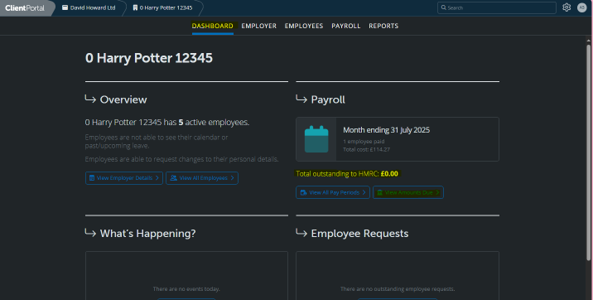
2. On the Dashboard click – View Amounts Due under Total Outstanding to HMRC
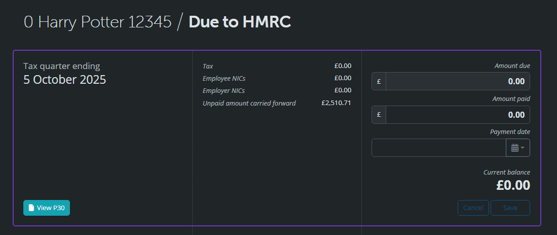
3. Here you can see an overview of the amount owed each quarter – please do not make any payments until payment details appear under the Tax Quarter Ending heading.
These are the details you are waiting for – if these do not appear, your references have not been issued yet so payment cannot be made.
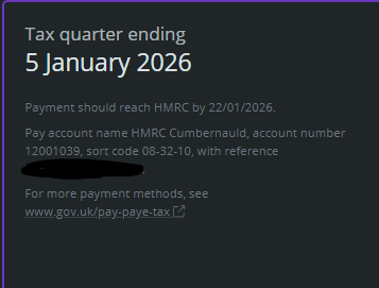
4. Using Your Accounts Office Reference Number as the Payment Reference, you can then make a bank transfer to HMRC of the amount owed.
### HMRC’s Bank Details
Account Name: HMRC Cumbernauld
Account Number: 12001039
Sort Code: 08-32-10
Payment Reference: \*Accounts Office Reference Number\*
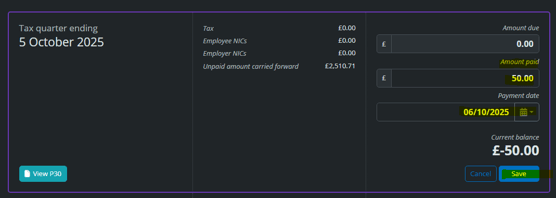
5. Once the Payment has been made, you can update Brightpay Cloud with the amount paid and the date of payment to keep track and ensure nothing is missed
[](https://dhdirectpayments.co.uk)
dhdirectpayments is a payroll bureau specialising in payroll & payment services for Direct Payments and personal health budgets
### Contact Us
1 Park Road
Hampton Wick
Kingston Upon Thames
KT1 4AS
[0800 029 7070](tel:+448000297070)
[payroll@davidhoward.co.uk](mailto:payroll@davidhoward.co.uk)
-
### Useful Links
[About](https://www.dhdirectpayments.co.uk/about-us)
[Reviews](https://www.dhdirectpayments.co.uk/reviews)
[Regularity Information](https://www.dhdirectpayments.co.uk/regularity-information)
[Terms and Conditions](https://www.dhdirectpayments.co.uk/terms-and-conditions)
©2026 dhpayroll. All rights reserved into leads
```json
{
"@context" : "https://schema.org",
"@type" : "HowTo",
"description" : "A step-by-step guide to paying PAYE to HMRC using Brightpay Cloud, from checking amounts due to updating payment records.",
"name" : "How to Pay PAYE to HMRC with Brightpay Cloud",
"step" : [ {
"@type" : "HowToStep",
"name" : "Login to Brightpay Cloud",
"position" : 1,
"text" : "Login to Brightpay Cloud at https://client.brightpay.com/",
"url" : "https://www.dhdirectpayments.co.uk/bpconnect#step1"
}, {
"@type" : "HowToStep",
"name" : "View amounts due",
"position" : 2,
"text" : "On the Dashboard, click 'View Amounts Due' under Total Outstanding to HMRC.",
"url" : "https://www.dhdirectpayments.co.uk/bpconnect#step2"
}, {
"@type" : "HowToStep",
"name" : "Check the tax quarter details",
"position" : 3,
"text" : "Review the amount owed each quarter. Do not make any payments until payment details appear under the Tax Quarter Ending heading. If these details do not appear, your references have not been issued yet and payment cannot be made.",
"url" : "https://www.dhdirectpayments.co.uk/bpconnect#step3"
}, {
"@type" : "HowToStep",
"name" : "Make the bank transfer to HMRC",
"position" : 4,
"text" : "Using your Accounts Office Reference Number as the payment reference, make a bank transfer to HMRC of the amount owed. HMRC's bank details: Account Name: HMRC Cumbernauld, Account Number: 12001039, Sort Code: 08-32-10, Payment Reference: your Accounts Office Reference Number.",
"url" : "https://www.dhdirectpayments.co.uk/bpconnect#step4"
}, {
"@type" : "HowToStep",
"name" : "Update Brightpay Cloud with payment details",
"position" : 5,
"text" : "Once the payment has been made, update Brightpay Cloud with the amount paid and the date of payment to keep track and ensure nothing is missed.",
"url" : "https://www.dhdirectpayments.co.uk/bpconnect#step5"
} ],
"url" : "https://www.dhdirectpayments.co.uk/bpconnect"
}
```